The Mac Mini on the shelf runs about fifteen always-on services and hosts most of what is described on this site. If it dies, the questions are: what can I recover, how fast, and with what fidelity? My runbook has a recovery time objective of roughly one hour from a dead disk to a fully verified system. This post is the worked version of how that is possible for a one-person setup, and the gaps I have chosen to accept.
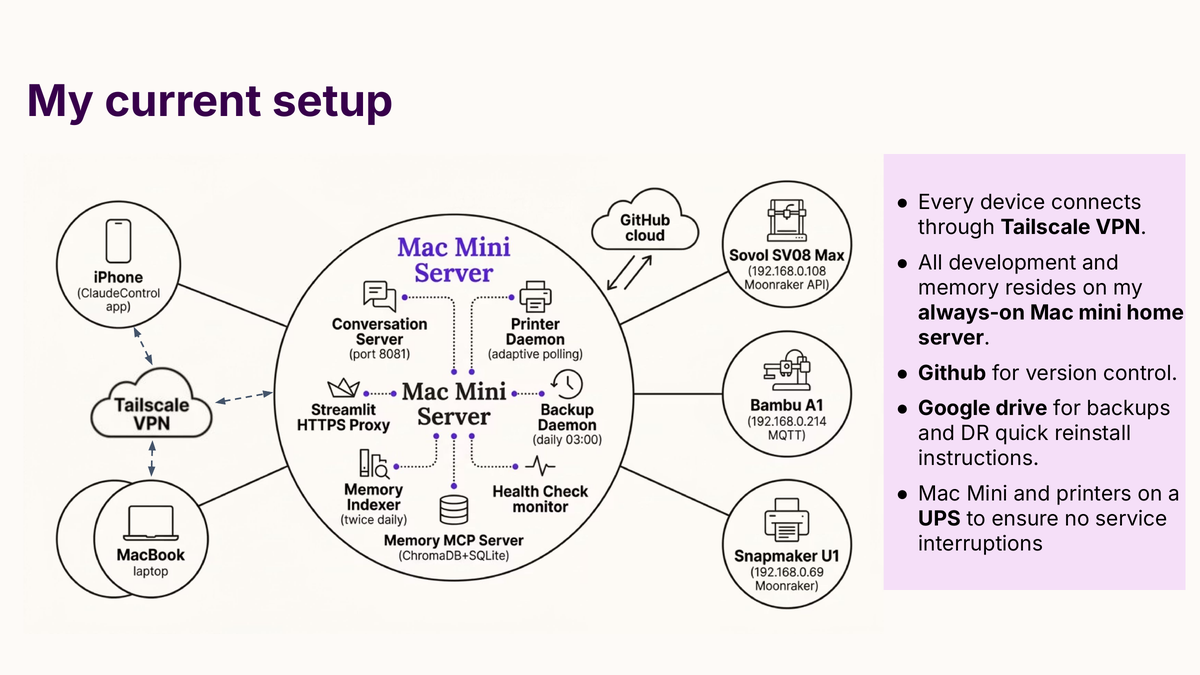
What is actually at risk
Seven layers can fail independently:
- Mac Mini disk loss. Full hardware rebuild or disk replacement.
- Google account compromise or lockout. Backup store unreachable.
- GitHub account compromise. Primary code store unreachable.
- Single Google OAuth token loss. Backups and the governors’ app stop working; the Google account is fine.
- Printer in an unsafe state. Covered in detail in a separate post on the layers of printer defence.
- Memory corruption. Topic files, vector store, or keyword index damaged.
- Conversation server outage. The daemon that brokers mobile access has stopped.
Five of the seven have happened at least once. The rest of this post covers the ones that shape the architecture.
What gets backed up
Everything authoritative and not cheaply regenerable is backed up; everything derivable or replaceable is not. The exclusions list matters as much as the inclusions list.
The daily backup, run at 03:00 by a LaunchAgent against Google Drive, captures:
- Code. All Python, shell, YAML, JSON, markdown, TOML and signing key files at the top level of
~/code/, plus subdirectories with local-only state (OAuth tokens, Streamlit secrets, encrypted context). - Control plane. The full
tim-claude-controlplanerepository: YAML manifests, hooks, LaunchAgent plists, scripts. Redundant with GitHub, on Drive so a simultaneous loss of GitHub and the Mac Mini is still recoverable. - Daemon scripts symlink-deployed under
~/.local/lib/and~/.local/bin/. - Claude Code configuration:
~/.claude/settings.json,~/.claude/keybindings.json. - LaunchAgent plists: every
com.timtrailor.*.plistunder~/Library/LaunchAgents/. - Memory topic files for the laptop project. The Mac Mini’s memory tree is a separate git repository pushed to GitHub, so it backs itself up independently.
The backup is differential by modification time and checksum, so the first run is slow and later runs upload only what has changed. A manifest at ~/code/.backup_manifest.json means restoring does not require re-reading every file. The full set is a few gigabytes uncompressed, sitting comfortably inside Google Drive’s free tier; I re-check that quarterly.
What is deliberately not backed up
Six categories are excluded, each with a specific reason.
The school governors’ raw document corpus (PDFs at ~/Desktop/school docs/). The source of truth is GovernorHub, and a weekly LaunchAgent syncs from there. Backing them up to Drive would consume almost all the backup volume and add no recovery capability; the restore path would still be “re-download from GovernorHub”. The processed encrypted context used by the governors’ app is backed up; the raw documents are not.
iOS application source trees. All five iOS apps (TerminalApp, ClaudeControl, GovernorsApp, PrinterPilot, and a shared SwiftUI framework) live in GitHub repositories, so recovery is git clone. The Xcode build artefacts are excluded.
The ChromaDB and SQLite full-text search (FTS5) indices backing the memory system. Derivable from the JSONL transcripts via a rebuild script.
JSONL session transcripts. The raw conversation history. The topic files, which hold the authoritative memory, are backed up via the tim-memory git repository, and the indices can be regenerated from the transcripts or from the topic files in a degraded form. The transcripts themselves are not backed up.
If the Mac Mini loses its disk, the conversation history is gone. The facts survive, the indices can be rebuilt, the operational system works; what is lost is the ability to search specific phrasing of historical conversations. Logged explicitly in the runbook so future-me does not conclude the transcripts are protected when they are not.
iOS application signing certificates. Re-downloaded from Apple’s developer portal on rebuild.
Ngrok or Cloudflared tunnel tokens. Removed in March 2026 in favour of Tailscale, which does not require persistent tunnel state.
The one-hour sequence
Twelve ordered steps. Most are mechanical.
-
Reinstall operating system and developer tooling. macOS from recovery, then Homebrew, then Xcode command-line tools. The slowest step, bottlenecked by internet speed.
-
Install Tailscale and rejoin the tailnet. Mac Mini Tailscale address
100.126.253.40, local-network address192.168.0.172. Everything downstream needs to be reachable from other tailnet devices. -
Generate a new SSH keypair. Add the public key to the
timtrailor-hashGitHub account so private repositories can be cloned. -
Clone the control plane repository first. It is the install orchestrator; its
deploy.shdoes the rest. -
Clone the application repositories. Eight in total: the mobile conversation server, the printer tools, the governors’ application, and five iOS application repositories.
-
Restore the memory tree. The memory git repository is separately managed under a dedicated SSH configuration; clone it into the location Claude Code expects.
-
Restore non-source artefacts from Google Drive. Credentials file, OAuth tokens, Slack configuration, Model Context Protocol (MCP) approval lists, encrypted governors’ context, Apple Push Notification signing key, transport layer security (TLS) certificates. The backup script’s restore mode takes a manifest and pulls each file from Drive.
-
Seed the macOS Keychain with secrets. Deliberately not in the Drive backup. Each secret is added from the list in
services.yamlundersecrets:blocks; the source is either a printed backup code kept offline or a regeneration from the upstream service. -
Seed a file containing the keychain password. A
chmod 600file at~/.keychain_passis required by a LaunchAgent that unlocks the keychain at boot, so daemons without an interactive login can read from it. An accepted trade-off for a headless Mac Mini with physical security. -
Re-download the school governors’ documents from GovernorHub. The sync script runs against a cookie stored in keychain; the first run restores the local copy.
-
Run the atomic deployment script from the control plane repository. Installs LaunchAgent plists, symlinks hooks, rules, subagents and skills into
~/.claude/, runs verification, and rolls back if verification fails. -
Reboot. Verify. Suite in the next section.
The human decisions are steps 8 and 9 and the implicit step-11 decision of whether to trust the automatic rollback.
Verifying the rebuild
Declaring recovery complete means passing an ordered sequence of smoke tests, each in seconds, total under five minutes.
- Hook checks and scenarios.
verify.shruns hook integration tests and the pytest scenario suite. The line I trust is “0 failed”, not a fixed pass count, so a silently broken hook gets caught. - Health check.
health_check.py --onceprobes every monitored service: printer reachability, daemon liveness, backup freshness, memory system integrity. - Acceptance tests.
acceptance_tests.pyruns an end-to-end check suite. Expected compliance: 100%. - Mobile readout. From my iPhone, open ClaudeControl or TerminalApp; the home tab shows printer status and service health. Expected: no red banners.
- End-to-end printer send. A small calibration cube to the Sovol SV08 Max. If the printer accepts it without a firmware restart, the toolchain from iOS through conversation server through printer tools is working.
- Backup dry run.
backup_to_drive.py --dry-runproduces a short upload list, showing the differential logic is working against the restored manifest.
If any fails, recovery is incomplete. I investigate, fix or roll back, and try again.
Emergency access while the rebuild is in progress
If I need access while the Mac Mini is being rebuilt, several paths remain:
- The laptop. A partial mirror of
~/code/on the MacBook Pro can run the memory server and health check locally, so the laptop can temporarily serve as conversation server, memory host and iOS backend. The iOS apps have configurable backend addresses; switching from the Mac Mini’s Tailscale address (100.126.253.40) to the laptop’s (100.112.125.42) shifts the load. - The printers. Printer tools query Moonraker on the printer’s own address (
192.168.0.108for the SV08 Max). Any machine on the local network or tailnet can drive the printer; an emergency pause is a singlecurlagainst Moonraker. - GovernorHub sync. Runs on any machine with Python 3.11 and the GovernorHub session cookie, so the sync and the governors’ application both run on the laptop or a web-hosted version.
Each critical piece has at least one fallback documented in the runbook.
The parts I have actually tested
Writing a runbook and executing one are different activities, and several parts of mine have run under real pressure rather than only in dry runs.
Step 7, restore of non-source artefacts. Restored the credentials file and OAuth tokens twice, once after a botched rename and once after a configuration change broke authentication. Both times the restore completed in a few minutes.
Step 11, atomic deployment with rollback. Triggered three times, always in development rather than recovery. Each time the rollback reverted the deployed state to the previous snapshot. Treating ~/.claude/hooks/, the LaunchAgent plists, and the deployed configuration as outputs of the control plane (not things to edit directly) is what makes rollback reliable.
Step 10, GovernorHub sync. Tested in April 2026 by deleting the local copy and running the sync cold; several minutes to re-download the full set, and the governors’ application rebuilt its encrypted context without intervention.
The full rebuild. I have not done a cold one-hour rebuild since building the runbook in this form. The components have been exercised in isolation and the verification suite is reliable, but the “under an hour” claim is forward-looking until I do one.
The gaps I have chosen
Three gaps in mine are real.
First, the JSONL transcripts. The conversation history is not backed up. The facts survive in topic files; the searchability does not.
Second, the keychain. The keychain itself is not in the backup. Secrets are seeded from printed backup codes kept offline, from upstream services, or out-of-band channels. Safer than backing the keychain up to Drive, but recovery requires access to those offline materials. If they are lost simultaneously with the Mac Mini, several secrets have to be regenerated from upstream. More work, not impossible work.
Third, the Drive backup itself depends on a Google account that is not encrypted at rest under a user-held key. The credentials file, OAuth tokens, and TLS private key sit on Drive as plaintext, protected by two-factor authentication and two account-recovery channels (my wife’s email and my phone). If all three are compromised simultaneously, the attacker has the backup. An acceptable trade-off for a single-operator setup; a more paranoid threat model would warrant envelope encryption before upload.
Every quarter I re-read these and check whether the decision to accept them is still correct.
What the runbook has taught me
Every ad-hoc secret seeded from memory became a keychain entry with a documented source. Every config file edited by hand became a file under control-plane management or an explicit restore-list entry. Closing the gaps the runbook exposed was the actual work.
It is also useful when nothing has failed. Reading through it periodically is the cheapest way I know to audit what I actually run; while writing and revising it I noticed services no longer needed, stale configuration files, and secrets that should have been rotated.
The next thing on my list is a cold rebuild against a wiped disk, timed.