Every automated helper I built to make my 3D printers more reliable ended up making them less reliable. Four got deleted. The fifth I rewrote so it could only watch, not act. The system is more reliable now than when those features existed, and the total code footprint is smaller.
The pattern I now treat as a rule: for agent systems running near anything that matters, recovery automation should observe and alert, never act. Intervention authority requires a human in the loop.
Below is each feature, what it was built for, what it actually did, and the incident that convinced me to remove it. The fifth is the one I almost kept because it sounded sensible.
Setup context
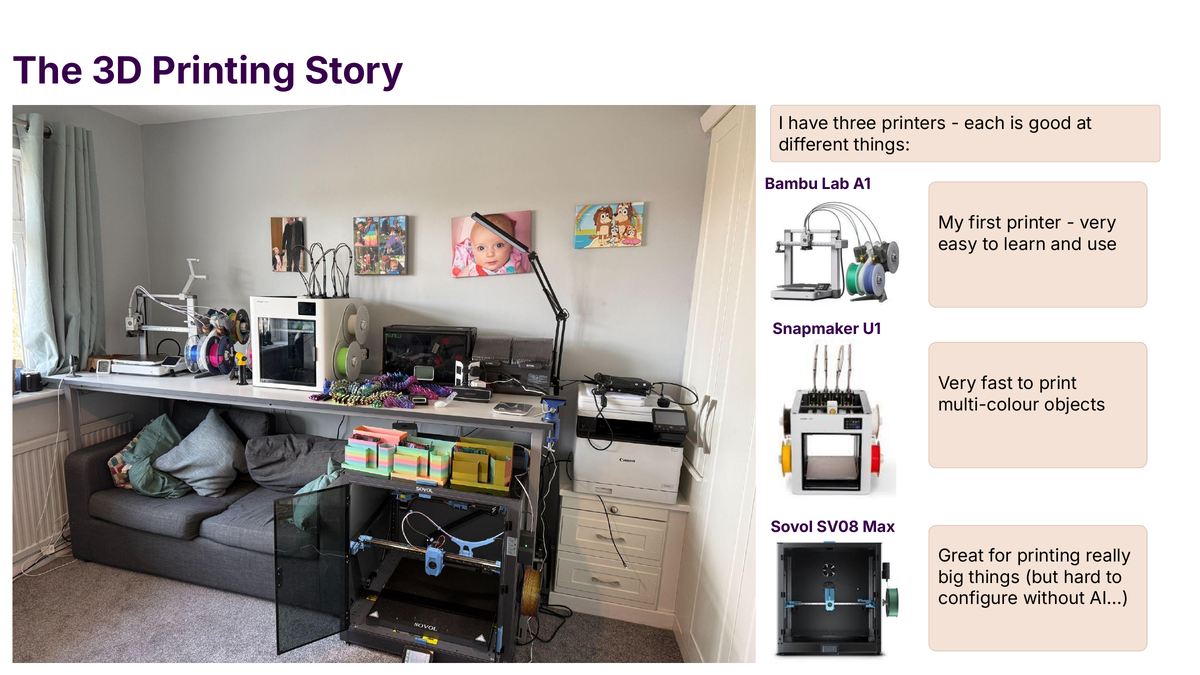
I run three 3D printers from a Mac Mini via Claude Code. Two run Klipper (a Sovol SV08 Max and a Snapmaker U1); the third is a Bambu A1. Each can take ten to thirty hours per print. Filament, time and part integrity are all at stake every hour.
The rest of this post is about the SV08 Max, the printer with the longest history and the most incident data. Every removal below was triggered by a real failed print with a date and a cost.
1. The UPS watchdog
What it was built for. A CyberPower CP1600 uninterruptible power supply (UPS) connects to the Mac Mini over USB; the Mac queries it via pmset -g batt. The idea was sensible on paper: if the UPS reports “On Battery Power” a power cut has happened, the printer might be affected too, and I want to pause cleanly before the whole house goes dark. The watchdog polled pmset every five seconds and triggered a planned pause on three consecutive “battery” readings.
What it actually did. CyberPower’s USB Human Interface Device (HID) link is not reliable at sub-minute resolution. pmset -g batt regularly returned “On Battery Power” at 100% charge for several seconds at a stretch despite no real power event, and three consecutive five-second polls fit comfortably inside one of those glitches. On 2026-03-12 the watchdog paused a long Zephyros print mid-flight; earlier in the month it had ruined another long print by firing into a pause macro that had a bug.
Why I removed it. Real power cuts during a print over the year preceding: zero. Watchdog-triggered print failures in the first three weeks: three or four. The risk it was built to mitigate was smaller than the risk it introduced.
What I run instead. macOS’s native pmset -u triggers a clean shutdown at 15% battery or 5 minutes remaining, a last-ditch guard for the motherboard rather than the printer. The Sovol has Klipper’s Power Loss Recovery (PLR) built in: a patched gcode_move.py writes the Z height and last command line on every Z-changing G1 move, and POWER_RESUME restores after a real hard cut. PLR is enough.
ups_watchdog.py was deleted on 2026-03-12 and the LaunchAgent plist removed. Documented in a memory topic with a permanent warning: do not recreate this, not even with “fixes”.
2. Auto-speed adjustment
What it was built for. A print’s optimal speed factor varies by layer geometry: a simple single-perimeter layer can run at 150%, a dense small-feature layer cannot. Manually watching and adjusting M220 is tedious, so the auto-speed adjuster polled the current layer from Moonraker, computed geometric complexity from a pre-processed gcode profile, and sent M220 at layer transitions.
What it actually did. It worked in isolation, not in combination with Klipper’s motion planner, which had already committed look-ahead plans based on the previous speed factor. When M220 was applied mid-flight, the planner’s acceleration and velocity assumptions were invalid for any move queued but not dispatched. On three prints between late February and mid-March 2026 I lost prints to layer-transition artefacts (ringing, blobbing, dropped layer adhesion) caused by mid-flight M220.
Why I removed it. I patched it three times. Each patch reduced the failure rate but none eliminated it, and the patches became elaborate: delay M220 by N milliseconds, only apply on odd layer numbers, skip the first layers, enforce bounds. Each was a sticking plaster on the wrong shape of fix. The right place for speed adjustment is inside the slicer’s output or Klipper’s motion planner; outside both, with best-effort polling, it is not solvable.
What I run instead. Four slicer-defined speed profiles (Standard, Silent, Sport, Ludicrous) which bake per-region speeds into the gcode itself, with manual M220 if I want to nudge. gcode_profile.py still exists for the ETA display, but its auto-speed output mode is disabled at source. A fix that has failed twice needs technical enforcement or removal, not a stronger text rule. I chose removal.
3. The enhanced Power Loss Recovery chain
What it was built for. Sovol’s native PLR is minimal: it saves the Z height and last G1 command, and POWER_RESUME re-homes and resumes, but it does not save speed factor, flow factor, fan speeds or the gcode file pointer. The “enhanced” PLR was a plr_enhanced.cfg layered on top: a SAVE_AND_PAUSE that captured everything, a PLR_AUTO_SAVE delayed gcode that wrote state to saved_variables.cfg periodically, and a POWER_RESUME that restored it all.
What it actually did. Under normal operation it was fine. Under abnormal operation it became the source of the abnormality. On 2026-03-01 the LOG_Z macro, called from the patched gcode_move.py on every Z-changing G1, raced with PLR_AUTO_SAVE on writes to saved_variables.cfg. Both were trying to update power_resume_z, and the file corrupted. Klipper refused to start; I fixed it by making LOG_Z a no-op and designating PLR_AUTO_SAVE as the single writer.
Then on 2026-03-05 a more subtle failure: under certain exit paths from SAVE_AND_PAUSE the enhanced chain caused a SAVE_CONFIG to run mid-print, flushing and restarting Klipper. The steppers de-energised, the print head dropped onto the part, and a twelve-hour job was lost.
Why I partly removed it. I kept SAVE_AND_PAUSE and POWER_RESUME and removed PLR_AUTO_SAVE as a delayed gcode. The functionality moved into a Mac-side daemon (plr_autosave.py) that calls Moonraker over HTTP, taking the state out of the printer’s own config-mutation path. If the daemon crashes the printer is unaffected; if saved_variables.cfg corrupts, the daemon rebuilds it. The SAVE_CONFIG-during-print path is now physically impossible from the PLR chain.
What remains. Three macros: SAVE_AND_PAUSE (pauses and captures state, never touches SAVE_CONFIG), POWER_RESUME (called by me after a real power cut), and clear_plr (clean up stale state). Klipper’s SAVE_CONFIG macro itself now refuses to run if print_stats.state is “printing” or “paused”, the actual 2026-03-05 fix.
4. The printer daemon’s auto-recovery path
What it was built for. Klipper can enter an error state for many reasons (a microcontroller shutdown, thermistor out of range, lost heartbeat). Some are recoverable with FIRMWARE_RESTART, so if the printer was idle the daemon’s auto-recovery path would attempt the restart, log it, and notify me. The idea was to reduce manual intervention for benign errors.
What it actually did. On 2026-03-11 a filament jam triggered the extruder microcontroller to shut down (thermistor briefly out of range during the jam) and the auto-recovery path activated without checking print_stats.state. A print was paused at that moment because the jam had triggered a pause rather than a cancel, so when the daemon sent FIRMWARE_RESTART the steppers de-energised, the print head dropped, and the twelve-hour print was lost.
Why I fixed it rather than removing it. I considered removing it entirely. The more I looked, the less necessary “recovery” was: I was at the printer, or Moonraker would have alerted me, or the next print would have triggered a clean restart anyway. Automated recovery saved roughly one click a week at the cost of catastrophic failure modes.
I fixed it because the fix was small and well-bounded: check print_stats.state before every action, and if state is “printing” or “paused” block recovery and alert instead. A handful of lines, and the daemon’s job changed from “attempt recovery” to “notice and alert”. I had corrected the same category of mistake (restart during a print) four times across different automations before the pattern became a hard macro-level block.
Any daemon with authority to act on a physical system has to be treated as safety-critical, with explicit state gates and incident-reviewed fail-safes.
5. The one I almost kept: the clog detector’s automatic response
What it was built for. Klipper on the SV08 Max has a CHECK_NOZZLE_CLOG macro that reads the filament buffer’s weight, extrusion rate and motion sensor; if it fires it pauses the print and alerts. Clearly useful. Less clearly useful was a second stage I had added: on clog detection, attempt a cold-pull-style purge (heat to 240, extrude 10mm, retract 40mm, repeat) and resume.
What it actually did. It worked once. Most of the time the automatic clear produced a worse state than the original clog: partially-extruded filament fused onto the hotend, a manual disassembly job, the print lost anyway. When CHECK_NOZZLE_CLOG was waking me up at night, the automatic response was a gamble I would not have taken awake.
Why I almost kept it. Removing an automation that “works half the time” feels like giving up, and the reflex in agent systems says more automation equals better. I was arguing in my head with an imaginary reader who would point out that something is better than nothing.
Why I removed it anyway. The failure mode was asymmetric. When the clear worked it saved a couple of minutes; when it failed it cost hours of disassembly plus the failed print. A coin-flip on a binary decision with asymmetric downside is negative expected value. The clog detection stays; the automatic response does not. For recovery automation near physical systems the downside is almost always asymmetric.
The pattern I now apply
For any new automation touching a physical system, five questions. I run them before writing any code; if any answer is “I do not know”, the automation does not get built.
- What commands can this code send to the external system? List every one.
- Does it check the system’s state before every action?
- What happens if the network drops mid-execution?
- What happens if the system is already in an error state?
- Can I stop it with a single command?
Every automation I have built that failed these questions failed in production.
What the system looks like now
The setup is lighter: a smaller LaunchAgent list, a smaller Klipper config, and fewer scripts under sv08_tools/. The printer is more reliable than at any point in the last year, and I have not lost a print to automation-induced failure since the last of these removals in mid-March.
For each daemon I now ask: when the worst-case failure fires, what is the blast radius? If the answer is “a print ruined” or “a config file corrupted”, it needs a hard state-gate in front of it or removal.
If you are running similar automations near physical systems, the five questions above are the cheapest place to start.